
You've Been Tracking Macros the Hard Way. We Fixed That.
Babette PepajShare
If you're someone who tracks macros, you already know the drill.
You find a recipe you love. You go to log it. And suddenly you're manually entering every single ingredient, doing math on serving sizes, questioning whether "1 cup cooked" is the same as "1 cup dry," and wondering if this is just your life now.
It doesn't have to be.
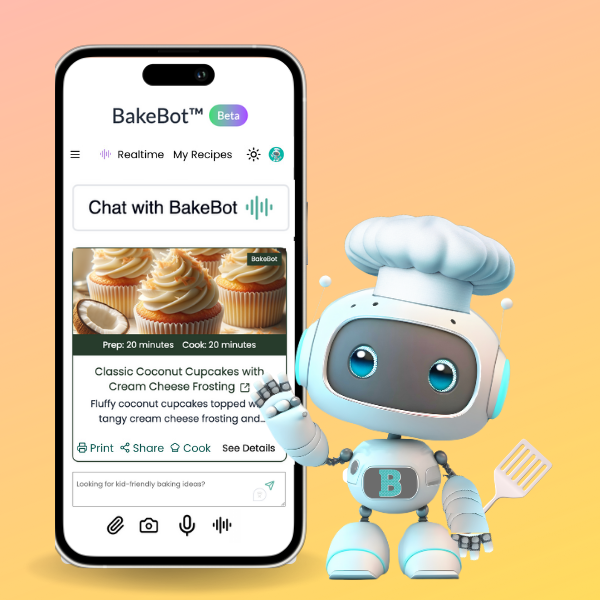
Today I'm so excited to announce that BakeBot.ai now calculates macros for you. Automatically. From basically anything.
Here's what I mean by anything.
Got a link to a recipe? Save it to BakeBot and the macros are done.
Found something on TikTok but only caught a screenshot of the ingredients before it disappeared? Upload it.
Have a cookbook you love and want to finally know what's actually in that banana bread? Take a photo of the page.
Spotted something on a restaurant menu that looks good? Snap it, and BakeBot won't just tell you the macros. It will write you the recipe so you can make it at home.
BakeBot reads it and does the math, backed by real data so you're getting verified numbers, not something a random stranger entered into a crowdsourced database.
And here's the one that might actually change your day: you can just ask. Out loud.
You're out at dinner, you ordered the salmon bowl, and you want to know roughly what you're looking at before you eat it. Just ask BakeBot. Or snap a photo of the menu. Talk to it like you'd talk to a friend who happens to know a lot about food. Voice, text, a photo, whatever works in the moment. BakeBot draws on deep recipe knowledge to think through what actually goes into a dish and gives you a real, informed estimate. No barcode scanner, no hoping someone entered it correctly, no paywall standing between you and your own nutrition data.
You're at the grocery store and can't remember if you already hit your protein for the day? Ask. Staring at a restaurant menu trying to decide between two things? Ask, or just show it to BakeBot. Standing in your kitchen at 6pm wondering if what you're about to make actually fits your goals? Ask.
And if you're in that very specific situation where you have exactly 20g of protein and 10g of fat left for the day and you need to figure out what to eat to close it out, yes, BakeBot can help with that too. Tell it what you have left and it'll give you options. It can even look at what's in your fridge and tell you what to make based on your remaining macros. That's not a feature that's coming someday. That's right now.
Why So Many People Are Done With Their Current Tracking App
If you've been using MyFitnessPal, Cronometer, or MacroFactor, I've been paying close attention to what's frustrating you. Because those frustrations are exactly why I built this.
MyFitnessPal used to be great. Then private equity got involved, the interface became a mess, features that used to be free disappeared behind a subscription, and the database (which was always only as accurate as whoever entered the data) became even harder to trust. Users have been loudly looking for an exit for a while now.
Cronometer is accurate, which people love, but it's tedious. Manual entry, an interface that feels like it hasn't been updated in years, and zero AI assistance when logging. In 2025 that's a hard ask.
MacroFactor has a smart approach but no web app, a slow feature rollout, and a database that still has gaps. A lot of users are patient but getting tired of waiting.
What all three of these apps share is that they were built around the assumption that you'll do most of the work. You'll enter the food. You'll find the entry. You'll do the math on your batch recipe. You'll figure out the restaurant meal yourself.
BakeBot flips that. You just tell it what you're eating or show it, and it figures it out.
Why Bowl-Style Meals Are Easier to Track (And Why That Matters)
Here's something I find really interesting. When people search for macro-friendly recipes, they're not just looking for "healthy food." They're looking for meals that are easy to log accurately. And that search almost always leads them to bowl-style meals.
Why? Because when ingredients are layered separately, you can see and weigh each component. Casseroles and lasagnas are delicious but tracking them is a nightmare because everything is baked together and portion sizes are basically a guess.
Bowl meals solve that. And they're also just really good.
That's why we picked these five macro-friendly recipes to show you exactly how BakeBot handles the math:
Egg Roll in a Bowl (Crack Slaw) — High protein, low carb, endlessly customizable. BakeBot calculates it whether you save the link, snap your screen, or just ask "what are the macros in egg roll in a bowl?"
Taco Bowls — A macro tracker's best friend because every ingredient lives in its own lane. Ground turkey or beef, rice or lettuce, beans, cheese, sour cream. BakeBot breaks it all down.
Crunchy Pickle Chicken Salad — One of those hidden protein recipes people search for when they're trying to hit their protein targets without eating plain grilled chicken for the fourth day in a row. Tangy, satisfying, and BakeBot will tell you exactly what you're working with.
Protein Overnight Oats — The meal prep hero. Make a big batch on Sunday, save the whole recipe in BakeBot once, and it knows your macros every single morning without you having to do anything again.
One-Pot Turkey Chili — This one comes up constantly because it's a multi-serving recipe made in one pot, which is exactly where people get stuck. How do you calculate macros for something you made a whole pot of?
How to Calculate Macros for a Multi-Serving Recipe
This is one of the most searched questions in the macro-tracking world and honestly one of the most frustrating things to do manually. Here's how it works in BakeBot:
Save your recipe, whether it's a link, a photo, or something you type in. Tell BakeBot how many servings the recipe makes. That's it. BakeBot calculates the total macros for the whole recipe and divides it by serving so you know exactly what one bowl or one container of your meal prep is worth. No spreadsheets. No math. No arguing with yourself about whether your chili ladle counts as a large or medium serving.
We Built This Because Tracking Shouldn't Be This Hard
People who are serious about their nutrition goals were telling me they'd do great all week and then fall apart on the weekend because tracking got too hard when life got real. When you're at a restaurant. When you're cooking from a recipe that isn't in any app. When you screenshot something from Instagram because it looked good and then never made it because figuring out the macros felt like homework.
And here's the thing nobody talks about: sometimes you eat something at a restaurant that is so good you just want to make it at home, on your terms, with macros you can actually control. Now you can. Snap the menu, get the macros, and get the recipe. All at once.
The tracking tools we've had weren't built for how we actually eat and cook. They were built for people who only eat things with barcodes.
You deserve better than that.
No More Guessing. No More Skipping the Things You Actually Want to Eat.
The whole point of tracking is to give you freedom, not take it away. When the process is easy, you actually do it. When you do it consistently, you see results. That's it. That's the whole thing.
BakeBot.ai works on web right now and is fully mobile-friendly, so you can use it from your phone, your laptop, wherever you are. Save a recipe, snap a photo, type a question, or just say it out loud. However you want to use it, we'll handle the numbers.
Come try it at BakeBot.ai and start with one of those five recipes above. I'd love to know what you think.
Leave a comment about what's the most challenging thing about tracking macros.