
How I Made an AI Ad That Actually Makes You Feel Something
Babette PepajShare
AI can make dragons. It can make flying unicorns over neon cities. It can make explosions so beautiful you forget that the guy running away from them has six fingers on one hand and no shadow.
And that's fine. That stuff is fun to watch. But it's also kind of easy. When everything is so over the top, so fast, so wild, you don't notice the flaws. Quick cuts hide a lot. A unicorn doesn't need to look like a specific unicorn. Nobody's going to say "that dragon's face changed between shots."
But a grandmother? A grandmother has to look like the same grandmother every single time she's on screen. A woman holding a recipe card has to have the same hands, the same kitchen, the same light. A lonely old man has to break your heart in one look.
That's where AI gets really, really hard.
The Challenge I Gave Myself
This year, Artlist launched a Big Game Ad Challenge. Make a commercial using their AI Toolkit and only their kit. The best one wins $60,000. And I thought, okay, we've been making BakeBot content all year. We did a parody of delivery app ads where we poked fun at all those celebrity fees. We did a whole three-part Snackageddon series about the chaos of planning a game day party when everyone suddenly has a new diet. Those were fun. Quick. Punchy. Surely I can do one more... for $60,000!
But for this one, I wanted to try something different. I wanted to make the kind of ad that makes you put your phone down and just... feel something. I wanted to make BakeBot's version of Google's Loretta.
If you haven't seen Loretta, go watch it right now. I'll wait. It's an old man using Google Assistant to remember things about his late wife. Her favorite flower. The way she'd snort when she laughed. It's two minutes long and it will destroy you.
The reason it works is that the technology disappears. You forget you're watching a Google ad. You're just watching a man who misses his wife. The product is there, it's useful, it's doing real things. But it gets out of the way and lets the human story breathe.
That's what I wanted for BakeBot. Not "look what AI can do." But "look what people do when AI helps them just enough."
Three Kitchens, Three Stories
I wrote an ad with three stories woven together. A woman who finds her late mother's ruined recipe card and asks BakeBot to figure out the missing ingredient. A granddaughter who can't understand her abuela's Spanish and uses BakeBot to translate in real time. And a young woman who notices her elderly neighbor watching the game alone, asks BakeBot for a cocktail from his generation, and walks through the snow to bring him one.
Each story starts with someone alone and ends with them connected to someone else. BakeBot is the bridge, but the cooking is what walks across it.
Here's the thing. Writing that was the easy part. Making AI bring it to life? That's where I almost lost my mind.
The Problem with AI People
AI is incredible at environments. Give it "warm kitchen, yellow walls, afternoon light, terra cotta tile" and it'll hand you something gorgeous. Give it "snow falling outside a window at dusk" and you'll get a painting.
But give it "the same woman, in her late 30s, brown hair in a braid, wearing a red jersey, sitting on a bed, then cooking in a kitchen, then standing at a door greeting her family" and you're going to get four different women who vaguely look alike if you squint. And for some reason it kept wanting to add a Nike swoosh to every jersey (a bg no-no for the contest).
Consistency is the enemy of AI-generated video right now. And when you're telling an emotional story, consistency is everything. If the grandmother's face shifts between shots, the audience feels it even if they can't name it. The spell breaks.
How I Fought for Consistency (and Sometimes Lost)
Here's what actually worked for me. I used Google's image generation to create storyboards first. Not the video. Just 3x3 grids of still images for each character and each scene. I'd prompt for nine frames at once, showing different angles of the same person in the same space. Then I'd grab the ones that felt right and use those as reference for the video generation.
This gave me a visual bible for each character before I ever generated a single moving frame. It's the closest thing to casting and location scouting that AI production has right now.
But here's where it got messy.
When AI Policies Get in the Way of Your Story
One of my favorite sections is the grandmother and granddaughter cooking empanadas together. It's the warmest part of the whole ad. Their hands in the dough. The laughing. That stuff is pure joy on screen.
In my original script, the granddaughter was about ten years old. A little girl learning from her abuela. And the storyboard images I generated were beautiful. Heartwarming. Exactly what I wanted.
But when I tried to generate larger images and video clips with the child character, Gemini's safety filters kept blocking me. The policy flagged a child in certain compositions, even though there was nothing remotely inappropriate about a kid making empanadas with her grandma.
So I had a choice. Fight the system and burn through credits trying to work around it, or adjust the character. So I exported and rolled the dice.
That's the reality of AI filmmaking right now. Sometimes you have to let the tool shape the story a little. The trick is knowing when to push and when to pivot.
The Voice Problem
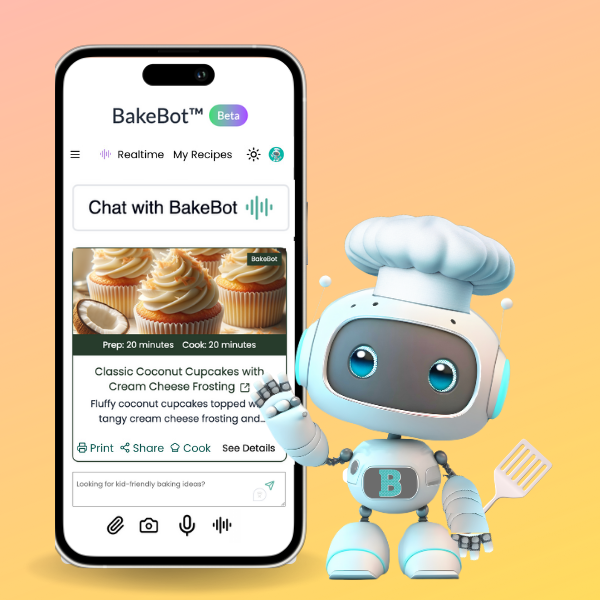
BakeBot has a voice. On the BakeBot.ai app, she talks to you while you cook. Hands-free, real-time, like having a friend in the kitchen. So I knew BakeBot needed to speak in this ad. But I could only use Artlist's tools. So I had to generate her voice using their voiceover app.
But here's the challenge nobody tells you about. When an AI voice speaks in a commercial, you have to make the audience understand WHERE it's coming from. In a live-action ad, you'd show someone talking to their phone and the phone answers. Simple. But with AI-generated footage, showing a phone screen is a nightmare. The text comes out garbled. The interface looks wrong. The hands holding the phone get weird.
My original script had people typing their questions into BakeBot on screen. That was version one. Then I realized AI text generation on screens would be a disaster, so I switched to voice (which BakeBot does beautifully in real-time and conversationally). The characters talk to BakeBot the way you'd talk to someone sitting next to you. Casual, mid-thought, not explaining anything. "I just... I can't read the rest of it." "I don't understand what she's saying." "I think he's a whiskey guy." But AI voices aren't great. They'd sound like robots and BakeBot would sound like voice over. What a mess.
So decided to make BakeBot's voice guide us like she would in the real world. It's the only thing you hear until grandma speaks. And it works! Sometimes the limitation IS the creative breakthrough.
The Shot That Got Away
Early feedback told me the first shot should show the recipe box with "Mom's Recipes" written on it. Great note! It immediately tells the audience what we're dealing with. I was able to generate a beautiful still image of a dented tin box with those words on the lid.
But when I tried to turn it into a video clip, the hands reaching for the box went sideways. Extra fingers. Wrong angles. The stuff that pulls you right out of the story.
So instead of forcing it, I changed the voiceover to make the context clear without needing the text on box. The woman's voice does the work that the prop was supposed to do.
This is maybe the biggest lesson I learned. When AI can't give you what you want visually, see if sound can carry it instead. Voice, music, ambient sound. Half of filmmaking lives in what you hear, not what you see. And audio is a lot easier to control than AI-generated hands.
What I Want You to Know If You're Trying This
If you're reading this because you want to make AI content that feels real, here's what I'd tell you after going through it:
Start with the story, not the tool. I wrote a complete script before I opened a single AI app. I knew the three stories, the emotional arc, the ending image. The technology served the story. Not the other way around.
Build storyboards before video. Generate image grids to establish your characters and worlds. It's faster, cheaper, and gives you a reference library to work from. Don't go straight to video generation. You'll burn through credits chasing consistency you haven't established yet. Use a paid pro account on Google's Gemini (with a personal gmail account... it's cheaper!) And then use Google's FLOW site to create the storyboards for free (with a pro account).
Use intercutting to your advantage. My three-story structure wasn't just a creative choice. It's a production strategy. When you cut between three different visual worlds, slight variations in AI-generated faces between shots get masked by the editing rhythm. The audience resets when you change locations. This is the single biggest trick for maintaining believability in AI filmmaking.
Let the limitations redirect you. The typing became voice. The recipe box text became a voiceover change. Every limitation pushed the ad somewhere more interesting than where I was headed. Tools like Artlist are pricey so you need to manage your credits. The best VEO3 tool they have is 3000 credits per 6 seconds of video. You will eat your credits up if you start on the platform. It's best to upload your first shot and last shot for complete control and then tell the tool in the prompt what happens. Say no music or voice if you don't want them talking. :)
The Point of All This
Anybody can make AI do spectacle. Explosions. Fantasy worlds. Things that have never existed. That's the easy stuff because it has no reference point. Nobody knows what a dragon is supposed to look like, so any dragon is convincing.
But making AI create a quiet moment between two people? Making it generate a look on someone's face that carries the weight of a memory? Making an audience feel something real from pixels that were never alive?
That's the frontier. And we're not there yet. Not completely. But we're close enough that if you care about the story more than the technology, you can make something that matters.
Good AI inspires. Great AI disappears. It just makes you feel.
That's what I tried to do with this ad. Whether it wins the contest or not, I'm proud of what we built. And if it makes even one person call their mom and ask for a recipe, that's the real win.
Don't wait to write down the recipes that matter to you. The people who taught them to you won't always be there to ask.
Watch our BakeBot Big Game ad and our other game day content:
🎬 BakeBot Big Game Ad - "It knew what was missing" [LINK]
📺 Snackageddon Series - When everyone at your party has a new diet [LINK]
🎭 The Celebrity Tax - What you're really paying for when you order delivery on game day [LINK}
BakeBot.ai is the first AI kitchen assistant built by home cooks, for home cooks. It reads recipes, translates in real time, answers your cooking questions, and helps you preserve your family's food traditions. Try it free at BakeBot.ai or on BakeSpace at BakeSpace.com/Bakebot.